Showing posts with label Scenery Streets and Roads. Show all posts

Monday, July 3, 2023

An Inn for Stafford Mills


For some reason I always seem to manage to find the time to complete a model over the 4th of July weekend. This year that model is this BEST Trains Colonial house with kitchen addition. I intend to brand this as a small New England inn.  

Nothing particularly noteworthy about the assembly process. I did note that all of the window openings (and there's a LOT of them!) are cut just slightly undersize - meaning I had to enlarge them just a little to get the plastic windows to fit. Also, the stone foundations on a lot of these BEST kits seem to be a just a little undersized - leaving an exaggerated amount of overhang between the wood structure and the stone foundation. In this case not a big deal and an issue that can be disguised with foundation plantings. I did a pair of Woodland Scenics carriage lamps on both sides of the front door. Other than that this was a real basic build. 

It's shown in the drone shot above in the approximate location on the Stafford Mills town area. I'm thinking on one or two more buildings for the upper street - perhaps a church or maybe a small town garage? Another option is a house or perhaps a cafe???? 

On the other hand I want this to look like a New England country lane, not a downtown Main Street!

One additional detail needed before this is planted in place - a sign:

Extra points to anyone who gets the reference ...


Monday, May 29, 2023

Country Lanes for Stafford Mills

This aerial view shows the basic layout of the streets in Stafford Mills

Spent a couple of hours in the basement yesterday getting the foundation for the roads installed in Stafford Mills. 

The first step was cut away the area for the country store. Since I'd installed the store on its own rectangular base this was simply a matter of determining the stores final position (It's in a slightly different spot than in the previous blog post), marking the outline of the base, and sawing out the scenery. 

Although I planned to use sheet styrene for the roads, I didn't have any larger sheets of plastic so I opted to use cardboard instead. The first step was to take the paper templates (see previous blog post) and cut them apart to arrange them on the large sheet of cardboard in order to minimize wasting any material. I ended up with four sections.

I used a saw to create a smooth path for the roads. 

When installing streets in a hilly area you need to be careful to avoid overly steep climbs and sudden grade changes. And since the basic landform scenery was already in place there were a few spots where the road climbed a hill just a little too steeply, or the road wasn't level across its width. The solution was to trace the outline of the cardboard road pieces onto the ground and then use a utility knife and a fine toothed saw to produce cuts in the scenery. 

I did narrow the roads as they got closer to the wall. 


On the left side the road climbs to a slight crest before heading down towards the rear. 

On the right side the road will disappear into the trees. 

Once I liked how the road looked I glued it in place with hot glue, using heavy weights to hold it in place. 


The one problem with cardboard roads is that can easily swell and warp when painted - especially with acrylic paints. So I sealed the cardboard with Polycrylic sealer and allowed them to dry overnight. Note the road hasn't been extended over the tracks and to the fascia. That's the next step. 


I couldn't resist positioning the camera for a test shot to see how the scene was shaping up with the various elements in place. The plan is to include some "full scale" HO trees between the road and mill river in order to screen the brick mill and contribute to the illusion of distance. The large open area to the left may (I'm still not sure) become home to a white steepled church, a New England signature element if there ever was one. 


Saturday, May 27, 2023

"Next Stop - Stafford Mills"

This is the approximate position of the Magoun Store. 
With the Missisquoi River crossing scene completed it's time to head to the opposite side of the Junction and finish up the Stafford Mills scene. "Stafford Mills" is the name I'm using to represent Sheldon Springs. Why change the name from the prototype you ask? 

I could give you some long explanation that I was concerned that two or three operational locations on the layout named "Sheldon something" - would confuse operators. Or how I wanted to include some elements that weren't part of the prototype scene so I couldn't say I was "modeling Sheldon Springs." 

The real explanation is pretty straightforward: "Stafford Mills" is a town name I dreamt up back in high school while trying to look like I was paying attention in Father Brisette's chemistry class and I kind of like it... (the town name, not chemistry!)

For some details on how Stafford Mills got to its current state you can look at this blog post. You can also check out the two videos on "Forced Perspective" on my "CVSNE" YouTube channel. 
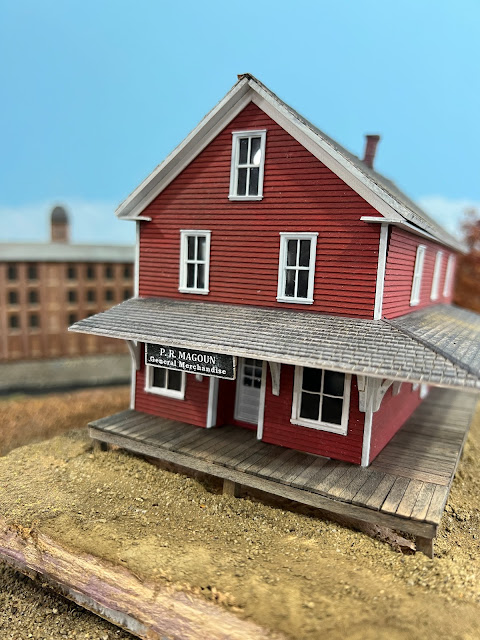
The impetus to work on this section of the layout was digging out the half (okay, maybe 3/4!) finished BEST Trains Trussell store kit. Long time blog followers will recall I planned to include this building in Williams Creek on my former Roxbury Sub layout. I got the building mounted to a Gatorboard base, stained the roof, and added a couple of Woodland Scenics Easy Lighting LEDs. I also created a poor man's interior using photos of General Store interiors I found online.

I made a sign for the front of the store - christening it "P. R. Magoun's General Merchandise" - named for a former NMRA president and (more to the point) fellow Navy veteran and long time friend and strong supporter of the SNE. Friends of the SNE get buildings named after them - enemies of the SNE get their names on a plaque in the SNE HQ men's room ....(!) 

The first step in getting the store in place was to find a spot that it looked right. This was a little tricky with the N scale brick mill in the background. In the end I settled on the spot shown in the photo above. 

The N scale brick mill in the background of the scene. 

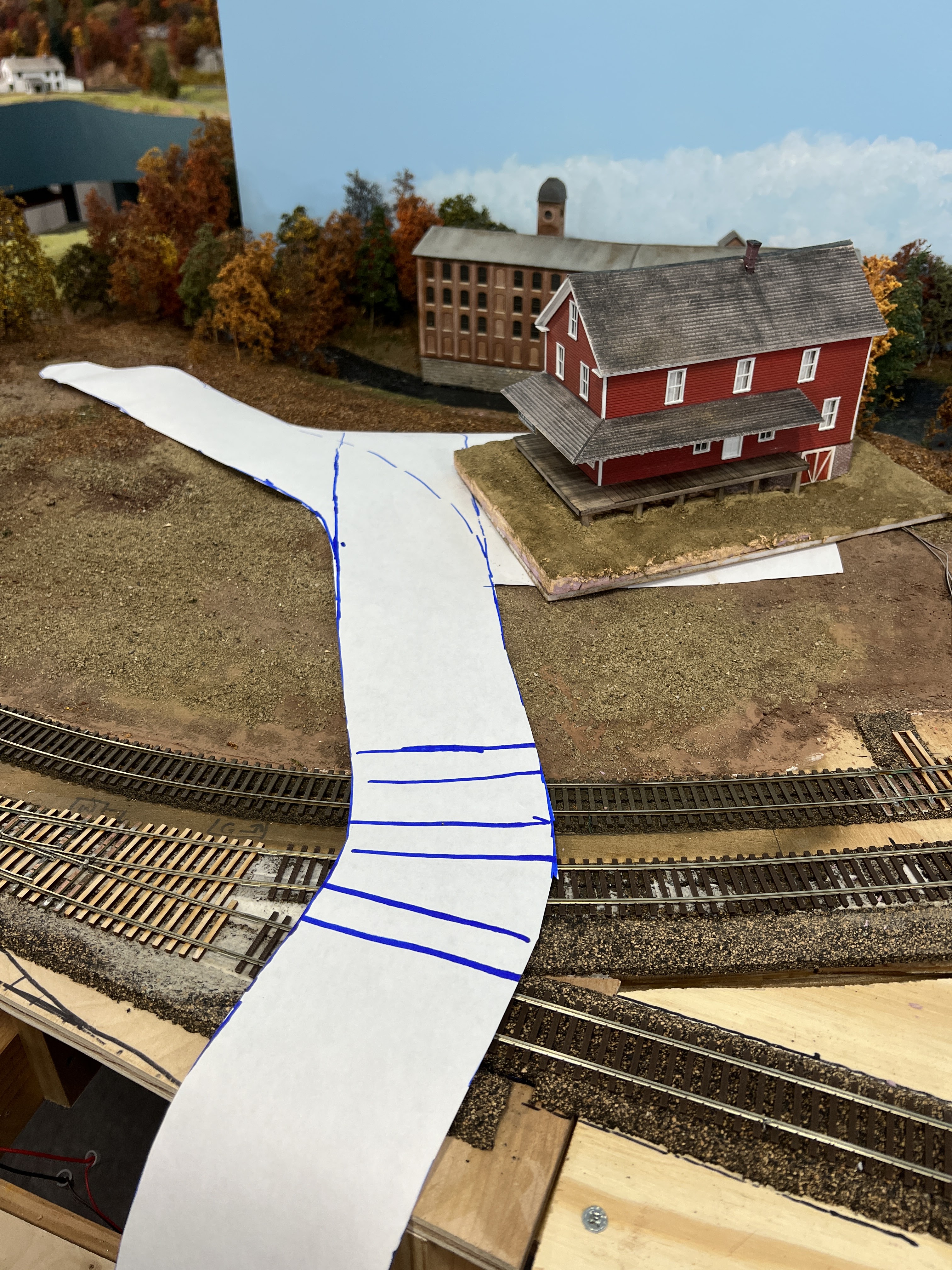
I also wanted to add a road in front of the store that would ultimately run towards the paper mill complex and tie these (and some future elements) of the scene together. 

I started by removing a lot of the trees that I'd installed along the front of the background mill river. Then I carefully placed a large sheet of paper and marked the approximate location of one side of the road. Then I removed the paper and cut out the roads themselves. 

I'll use the paper road as a template to cut the road base itself out of sheet styrene. But that's for the next blog post. 
Wednesday, September 14, 2022

Tile Grout Pavement - Create a Road to Somewhere...

Sanded tile grout pavement in place. Note the subtle variations in color and texture in the "older" pavement on the left. This was done by "stirring in" small amounts of darker and earth-tone grout when still dry.  

Since I built the basic benchwork going on three years ago, the town of Enosburg Falls, which is right up front when one comes down the stairs into the basement, has remained a partially scenicked, half done repository for stand in structures, surplus rolling stock and an assortment of tools and modeling supplies. And that's on top of the layout!

Getting the underside of the layout looking presentable was step one. The next item on the to-do list was to get the top of the railroad cleared off and at the very least ballast the track and install the roads. 

I won't elaborate on ballasting the track. I used pretty standard techniques. One thing I'll add about ballasting - a little ballast goes a LONG way, and too much ballast can reduce a well running layout to an engine stalling, derail inducing, mess. So when you ballast track use about half the ballast you think you need - and be especially careful with it around turnouts! 

I've tried all types of methods to make roads in the past. For smooth paved roads I think styrene may make be the best choice. But in this case I was looking to create an older, faded somewhat rough road. I tried Ceramic Stucco texture - which I've used with some success on building foundations - but that stuff is pricey. I also tried AK Interactive asphalt and concrete texture. I found the texture just a little too gritty for HO scale (it's great in larger scales) and if you think the artist medium like the Ceramic Stucco is expensive, just wait until you see the price for a very small tub of the AK stuff!


Oyster Gray - much lighter
than it appeared on the label.
 
I use tile grout as a base earth texture since it's easy to work with and inexpensive. I use sanded tile grout (for those who don't know, there are two basic types of grout - sanded, and unsanded). The sanded dries with a slightly gritty texture as you may expect. 

I went to Home Depot and ended up with two bags of sanded grout - one was a light gray color called Oyster Gray, the other a very dark gray (almost black) called Charcoal.  

Since neither color looked right I started combining them together. I worried I'd get a "salt and pepper" effect but frankly the stuff is fine enough that it really blended into a single color. 

About a 70-30 blend of Oyster Gray
 and Charcoal produced a faded
pavement color
.
 

Applying it is simple. I put masking tape to mark the width of the road and create a sharp transition from paved to unpaved areas. After mixing the grout to the desired color apply it dry to the area of the layout you want to pave. Then use a disposable foam brush to smooth the grout. I noticed the lighter gray grout tended to have clumps - these were easy to break up during the smoothing process. 
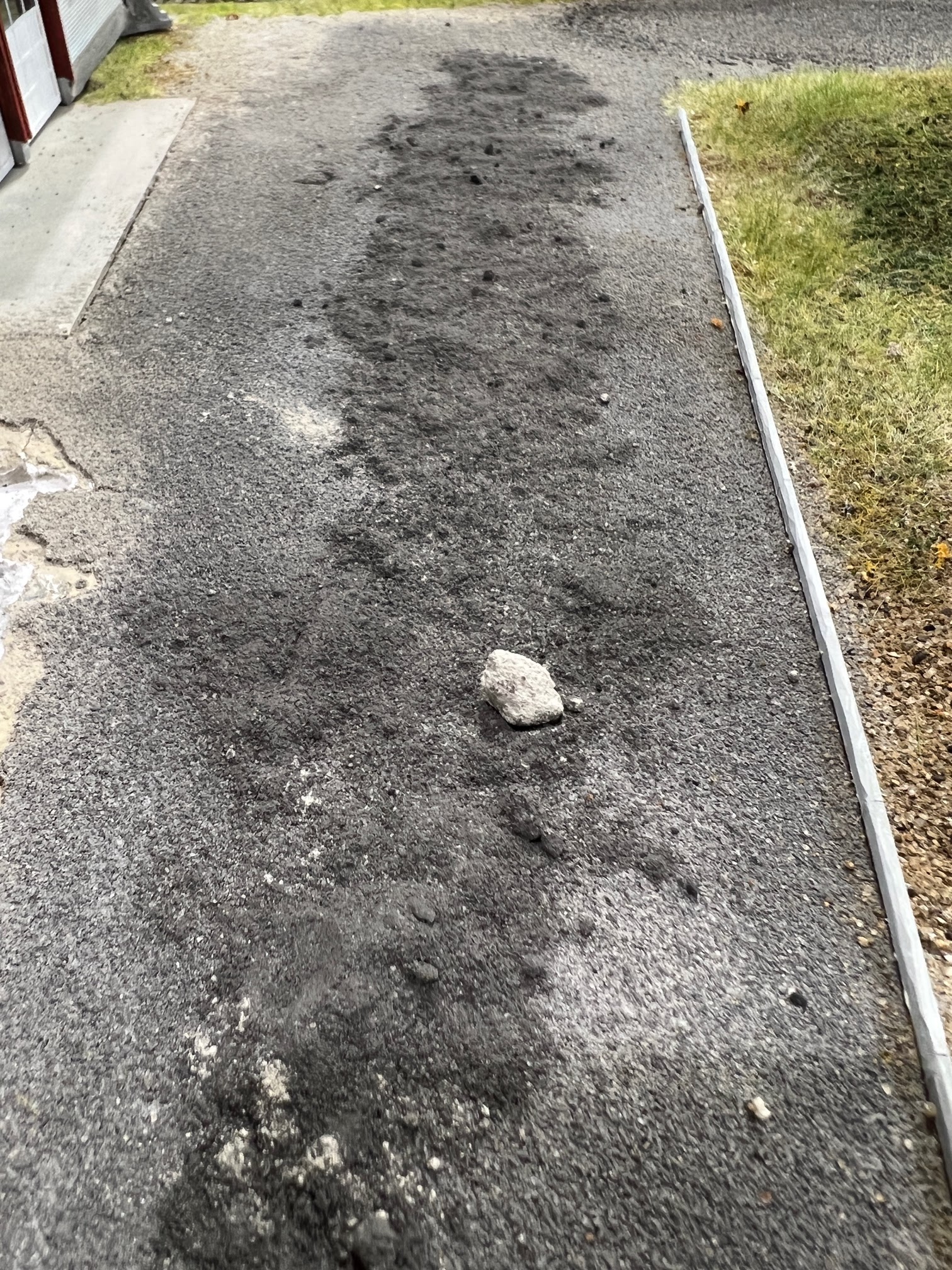
You can introduce subtle changes in the pavement color by manipulating the dry grout with the foam brush. You can also add more dark or light gray grout as desired. I even tossed a small amount of earth toned grout into the mix to warm up the pavement slightly. 

The last step is to secure the pavement in place. For this mist the grout with a mixture of alcohol and water (about 25% alcohol/75% water). Start with a gentle mist to "lock" the grout in place and then completely soak it. The next day it will be rock hard. 

In other news, I also started working in the basic landforms in the Berkshire area. Old magazines make great weights to hold the foam in place as the glue dries! 

And I've gotten most of the basic landforms in place around Kempinski Curve. It's ready for grass, foliage and some trees. 


Monday, January 17, 2022

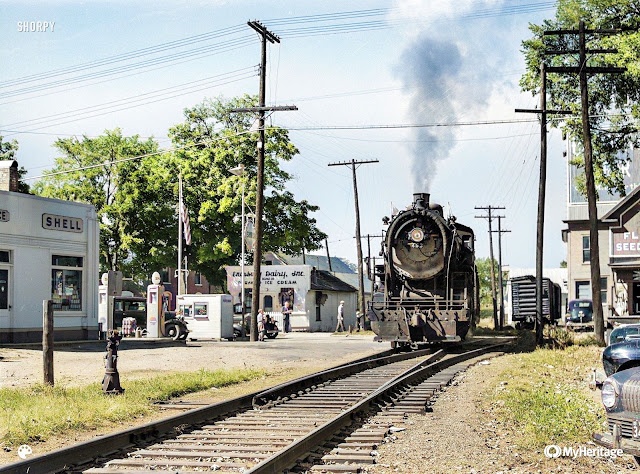
Enosburg Falls, 1941 in (Living?) Color

Jack Delano photo, Sep. 1941, Library of Congress, colorized from original black and white. 
 I've been working on drawing up some of the structures for Main Street in Enosburg Falls. Just for fun I ran the Jack Delano photo taken in September 1941 through the MyHeritage colorization app. 

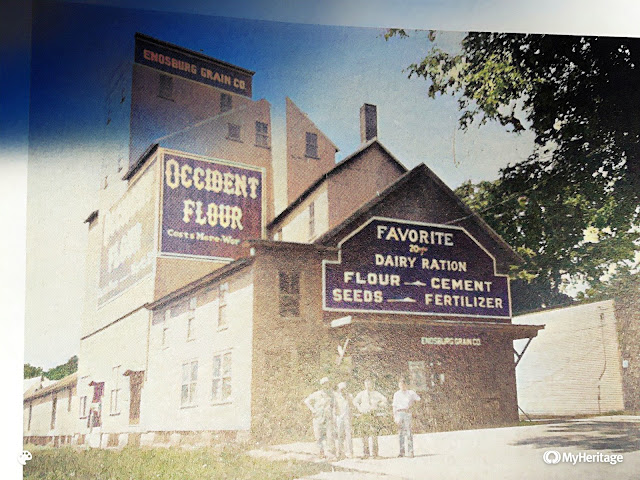
I also ran a photo from an  Enosburg Falls town history that showed the Enosburg Grain Co - about the same time as the Delano image. 

I originally thought the grain company building was painted some sort of "barn red" - but I'm not leaning towards an earth tone or perhaps a slightly browner version of yellow ochre. 

But the one thing I don't trust about the colorizer is the shade of the Shell signs - I would think they should be a much brighter yellow. 


Saturday, September 12, 2020

Super Tree Tip and a Country Road

A pasture scene almost ready for static grass and foreground trees.

Super trees, marketed by Scenic Express, are perhaps the best looking tree armatures on the market today - at least if the goal is a tree covered hillsides. The weakest part of the Super Tree is the slender trunk compared to the rest of the tree. Planting them in mass effectively minimizes that limitation. Of course, the scene will benefit immensely from some true foreground trees. I have a couple of ways to construct this that I may cover in a future blog post. 

But there's one other issue with Super trees that I haven't seen addressed in any of the videos, articles, or other tips I've seen published about using them. 

Look carefully at the top of most of the armatures and you'll notice a "crown" at the very peak of the tree. Look at the dark orange tree in the center of the image below:

Typically there's a gap between the top of the main "mass" of the tree and this little extra crown shaped branch. While it's acceptable sometimes it's usually something that doesn't look much like the growth pattern of a real tree, and therefore makes it obvious that this is a Super tree and not an oak, maple, elm, or whatever.


The easiest solution is to nip off the crown. I usually do this after the tree is planted. I simply look over the trees, identify the odd-shaped or unusually large "crowns" and snip them off the tree. 

Only about 70% or so of the material in any average Super Tree box is really usable. But don't throw the bits and pieces and oddly curved armatures away - they're useful for making those foreground trees. 

Dirt Roads

I've been experimenting with using sanded tile grout for a dirt or gravel road. This is a mixture of a dark and light tan, as well as a medium gray. I simply applied it to the surface of the layout, smoothed it with a putty knife, and then misted it with water mixed with alcohol. This is the first layer to build up the basic road. I need to go back and add a second finish coat - at the that time I'll add some planks to between the rails to create a road crossing. 


Monday, March 6, 2017

Essex Junction Backdrop update


Bernie came by for a short, but productive session on Sunday. His main tasker was to complete the Main Street backdrop scene in Essex Junction.  As you might recall, back in January, he came over and started to do a computer drawing of the buildings along one side of Main Street (essentially south east of the trainshed). Before he left that day we printed out a size test version of to make sure the scale and perspective would work and he finished up the drawing at home.
Yesterday he showed up with the final drawing and his bucket of backdrop paints and an assortment of brushes. He dove right into painting the background foliage and distant treeline. We’re keeping the horizon line fairly low in this section of the layout since it represents a relatively flat town.
Instead of cutting out the buildings entirely, he actually painted the sidewalks, and some bushes and grass texture onto the paper.  This proved pretty effective.
Then he cut out the printed sky from the upper portion of the printed buildings, sprayed the back of the paper with photo adhesive, and placed it on the backdrop. 

After blending the road coloration, and adding some leafless “foreground” trees, I think the finished section of backdrop looks pretty good (the 3-d structures shown here are strictly stand ins!)  Next step is on me to finish the three-dimensional scenery in the foreground, and add the “real” structures to both sides of the street to not only get the right look but to hide the edges of the backdrop section, and add the foreground foliage.
That has to wait until I finish the tracklaying/wiring in this area. While Bernie was working on his art project (and after he took off), I managed to get the track complete from north staging to the trainshed.  Over the last couple of weeks I’ve handlaid a half dozen or so turnouts in Essex Junction, so it should be a simple matter to “connect the dots” with the rest of the track. 

Wednesday, February 1, 2017

Inauguration – uh, make that “Backdrop” Day Review


I’ve been relatively successful at painting mountain scape backdrops.  The “townscape” backdrops present a far more difficult challenge.
Of course, the obvious solution would be a photographic mural behind the entire railroad.  There are two problems with this approach.  If I was modeling “today” it would be relatively simple matter to go to Vermont and take photos as needed. But I’m not modeling today – and while things change slowly in New England, they do indeed change, meaning contemporary photos are filled with structures, signs, vehicles, road markings, and a myriad of other details considerably different now than they were then. Secondly, while a full photographic backdrop (think wallpaper) may well look more realistic, I have a large layout – and the cost of such a backdrop would be prohibitive. The last quote I got to print one from my own artwork came close to what we spent on a 10-day vacation to London. Christine is very, very supportive of the hobby – but somehow I think her response would be “figure out another way to get from here to there.” Frankly, I wouldn’t blame her.
I suppose I could use photographs in the town and paint the open country backdrops. But that would look inconsistent to my eyes. Then there’s the question of blending – it would look weird to my eye to have photographs behind the towns, but painted mountainsides everywhere else. I first tried cutting the buildings out of photos, removing the inappropriate elements in Photoshop before pasting the buildings and streets to the wall.  I soon found the lighting on the photos I used from Google maps washed out several elements – primarily the church steeple. Also the trees in the photo had already dropped their leaves – a plus since I plan to model Essex as leafless, but cutting around the tops of trees created a very obvious seam between the painted wall “sky” and photograph treeline.
Prototype scene. Note how overexposed the church steeple is in this image.
Bernie Kempinski had run into a similar situation when he did a module depicting Alexandria, Va., in the pre-Civil War years for a local museum. Obviously there were no color photos. His solution was to draw the structures in Adobe Illustrator, colorize them, cut them out and paint the rest of the backdrop. Although it isn’t as “realistic” as a photograph, it is remarkably effective. So he volunteered to head away from DC on Inauguration Day to help me with the Essex Junction backdrops using the same basic approach.
He started by adjusting the angle of the main elements – the store, church, and house – to match the angle where the road meets the wall on my layout.  Then he traced over the photo in Illustrator to create the basic outline of the buildings. Once they were in place we dug out some vintage photos of this street in Essex to fill in the details that have changed over the years such as the arrangement of windows, doors, and various roof materials.
This photo shows an early “sketch” (the structures are not complete) temporarily tacked to the wall.
Before he left for the day he had added some details to the buildings and "tweaked" a few minor details. He then sketched a version with a road and some trees (plan is to actually paint the trees on the final version). These quick sketch trees are meant to help compose the scene:
I think a couple of things will work in my favor here. First of all, the left side of the backdrop shown here will be masked with a 3D “half model” of the old store that was just south of the trainshed (represented by a temporary red mockup in the photos), meaning we only have to really hide one joint. The other thing working in our favor is the scale of the elements, which isn’t really obvious in the close up pictures. The tip of the church steeple is about 6” above the layout surface and the benchwork is about 32” deep.
The Illustrator "sketched" buildings aren't as realistic as photographs, but they don't have to be. This is how the backdrop image looks from the aisle. 
Once all the 3D scenery and buildings are installed I think the result will be quite appealing. As Bernie and I discussed if it doesn’t work it’ll take about 10 seconds to erase it with some paint and start over.

Thursday, December 12, 2013

Building Waterbury: Park Row Pavement


The grade crossing on Park Row in Waterbury. Still needs
 a final sanding and the track needs final ballasting.
Got the initial coat of pavement onto Park Row in Waterbury. After toying with various methods to make the streets, including sanded tile grout (a little too gritty for an HO scale paved road) and styrene, which is a great material for streets but seemed a little too perfect for a side street in Waterbury, I settled on using lightweight joint compound. Before troweling it onto the layout I pre-colored it by putting some light and dark gray Bragdon Weathering powders in the tub of joint compound and mixing it thoroughly.  According to the CV Engineering Plats for Waterbury the street was 24 feet wide, so I taped a couple of Plastruct 1/8" angles to the layout surface at 24 scale feet apart. Close up photos of the grade crossing in my era shows the grade crossing wasn't planked. Instead there were two boards on the outside of the rails and one board on the inside of each rail with the paving material filling the space between the tracks and between the rails.
I cut these "planks" from a GLC Laser laser-cut grade crossing. After securing the wood to the ties with CA, I stained them with Hunterline "Dark Brown" stain. I was careful to leave enough clearance between each rail and the wood for cars and locomotives to run through without the grade crossing lifting the wheels. Once I confirmed everything was working I added narrow strips of painter's blue tape (cut the width of the wood planks) to prevent filling the gaps between the rails and the wood.
Park Row after the initial coat of lightweight
 joint compound. Although this looks like
 a rough road, the prototype was never a
very smooth ride!
Then I carefully spread the lightweight joint compound between the Plastruct angle. Once the joint compound started to "set" (after an hour or so) I carefully peeled away the tape, exposing the wood planks. Although I tried to get the road as smooth as possible when applying the joint compound there were still lots of bumps. So, after the joint compound dried completely I sanded the road smooth with a fine-grit sanding block.
Park Row is now ready for traffic.